



SSR Internals FULL
Lifecycle phases, protection contexts, architecture details, and troubleshooting for SSR hydration. For practical usage (generation, forms, computed), see Advanced SSR.
SSR Lifecycle
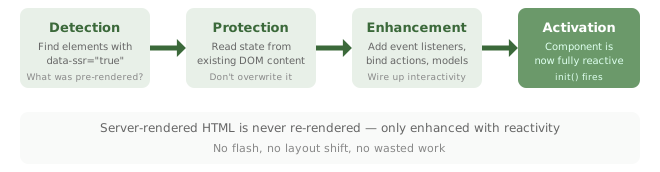
SSR components go through four phases managed by the SSRManager. Server-rendered HTML is never re-rendered, only enhanced with reactivity:
Batch Activation
When multiple SSR components exist on a page, use activateAllComponents() for coordinated activation:
// Activate all SSR components at once
if (wildflower.ssrManager) {
    wildflower.ssrManager.activateAllComponents();
}
Protection Contexts
The SSR system creates protection contexts to prevent the framework from interfering with server-rendered content. Here's what gets protected and why:
Protected (Preserved)
- Exact server-rendered HTML structure
- Form input states (checked, selected, values)
- List item order and content
- Computed values as rendered by the server
- CSS classes and inline styles
Prevented (Blocked During Init)
- List clearing during initialization
- Form input value replacement
- Content flashing or disappearing
- Event handler conflicts
- Unnecessary DOM writes
Template Requirements
SSR lists still need <template> elements even though the initial content is server-rendered. The template serves as the blueprint for any items added dynamically on the client:
<div data-list="items">
    <!-- Required: template for client-side additions -->
    <template>
        <div class="item"><span data-bind="name"></span></div>
    </template>

    <!-- Server-rendered items (preserved) -->
    <div class="item"><span data-bind="name">Item 1</span></div>
    <div class="item"><span data-bind="name">Item 2</span></div>
</div>Architecture
Understanding how SSR works internally:
Performance Impact
| Metric | Regular Component | SSR Component | Benefit |
|---|---|---|---|
| Initial Render | ~5ms per component | ~0ms (skipped) | 100% faster |
| Content Flashing | Visible (FOUC) | None | Better UX |
| SEO Impact | Limited | Full content | Better rankings |
| Time to Interactive | After JS load + render | After JS load only | Faster TTI |
Troubleshooting
Common Issues
| Symptom | Cause | Fix |
|---|---|---|
| Content flashes/disappears on load | Missing data-ssr="true" |
Add data-ssr="true" to the component element |
| Checkbox state not hydrated | Using data-bind instead of data-model |
Use data-model="prop" data-type="boolean" |
| List not interactive after load | Missing <template> element |
Add a <template> inside the data-list container |
| State mismatch after hydration | Server data doesn't match component definition | Ensure server HTML and client state have matching property names |
| Numbers parsed as strings | Missing data-type="number" |
Add data-type="number" to numeric elements |
| Nested state not available | Complex data not expressible in DOM | Use <script type="application/json" data-ssr-state> |
Debug Mode
Enable SSR debug logging to trace the hydration lifecycle:
// Enable debug mode
if (wildflower.ssrManager) {
    wildflower.ssrManager.config.logLevel = 'debug';
}

// Check SSR statistics
console.log(wildflower.ssrManager.getStats());
Expected Console Output
With debug mode enabled, you'll see messages tracing each phase:
SSRManager initialized (protection mode)
Protecting SSR element: <div data-component="todo-list">
Parsed SSR state: {items: Array(3), filter: "all"}
Enhanced component definition with SSR state
Activating SSR component for exact functional equivalence
SSR component now fully interactive
If you see "Protecting SSR element" but not "Activating", the component may be failing during enhancement. Check the browser console for errors.