WildflowerJS Reactive JS, No BS*

A no-build reactive JavaScript framework, rooted in the web platform.
No build step. No dependencies. No lock-in.

<script src="wildflower.min.js"></script> ...and start building.

Back to Basics

The code you write is 100% web standard code. HTML stays HTML. JavaScript stays JavaScript. CSS stays CSS. No JSX, no templating language, no custom syntax to learn. If you know the web platform, you already know how to use this.

WildflowerJS extends the web platform. It doesn't replace it.

Your Development Simplified

Because you develop with 100% web standards, every tool in your existing chain already understands the code: IDE, browser DevTools, linter, formatter, screen reader, SEO crawler. Nothing to install, no custom file types, no sourcemaps. Save the file, refresh, and your change is live.

Just be a web developer.

Batteries Included: One Mental Model

Router, SSR, stores, computed properties, two-way binding, event modifiers, data pools, and TypeScript types, all built in, all speaking the same language. Learn data-bind once and you know binding everywhere: lists, pools, stores, forms. There's no five-library stack to keep in sync.

One script tag. Everything you need.

<div data-component="counter">
  <span data-bind="count"></span>
  <button data-action="increment">
    +1
  </button>
</div>

<script>
wildflower.component('counter', {
  state: { count: 0 },
  increment() { this.count++ }
})
</script>

How It Works

data-bind connects state to the DOM.

data-action connects events to methods.

this.count++ triggers a precise DOM update.

Mutate state. The DOM updates.

Two Reactivity Modes

data-list for automatic reactivity: mutate state, DOM updates. data-pool for explicit control: plain objects, zero proxy overhead, you say what changed.

Same template syntax. Different performance profile. From interactive forms to per-frame particle systems. You choose the right tradeoff for the job.

Try it. Right-click, inspect this demo. Every dot is a real DOM element.

See full demo →

* Build Step

Zero Toolchain

Modern frameworks ask you to install a compiler, a bundler, a package manager, hundreds of fragile transitive dependencies, and a framework-specific file format, before you write a single line of your application.

WildflowerJS was built starting from a single principle: no build step, no tooling. Ever.

WildflowerJS asks you to add a script tag.

There's no CLI scaffolding step, no config files, no .vue/.jsx/.svelte source format. You don't debug through sourcemaps or wait on a build pipeline. Your project has zero dependencies.

Performance isn't a tradeoff. Build steps optimize bundle delivery, not the runtime work that follows it. WildflowerJS writes directly to the DOM, with no virtual DOM or reconciliation pass between state change and update, so it doesn't need a build step to be fast.

The framework is full-featured without the toolchain: router, SSR, stores, computed properties, transitions, pools. You don't need a toolchain to use any of it.

my-app/
  index.html
  app.js
  style.css
  wildflower.min.js

That's the entire project. No package.json.
No node_modules. No config files. Ship it.

Zero Install. Zero Attack Surface.

Every dependency you install is trust extended to a maintainer you've never met, running scripts on your dev machine and in your CI. A typical React + Vite + UI‑lib setup pulls in 300+ transitive packages before you write a feature.

Each one is a potential intrusion vector. NPM worms, OAuth chains compromising deploy platforms, postinstall hijacking: the supply chain is now where production code gets compromised, not the deploy. And signing isn't a backstop: Mini Shai‑Hulud (May 2026) compromised 170+ packages whose malicious versions carried valid SLSA Build Level 3 provenance, because the attestation came from build infrastructure the worm had already taken over.

WildflowerJS users don't have this attack surface, by construction. There is no npm install, no postinstall script, no transitive package graph. The framework is one file you copy or pin by hash.

As of v1.1, the same holds for building the framework itself. WildflowerJS bundles with a vendored rollup and terser pipeline pulled as three SHA‑512‑pinned tarballs: no npm install, no transitive packages, no postinstall scripts in the build path. The entire toolchain is three files you verify by hash.

Zero dependencies is the absence of a problem the rest of the industry has not properly addressed.

A typical React/Vue project:

  npm install
  ├── hundreds of packages
  ├── from hundreds of maintainers
  ├── postinstall scripts run on install
  └── tens to hundreds of MB of transitive code

WildflowerJS:

  <script src="wildflower.min.js"></script>
  └── 1 file.
      No transitive dependencies.

Zero Lock-in

WildflowerJS works with the DOM, not instead of it. There's no virtual DOM intercepting your code and no compiler rewriting your markup. The render cycle is yours.

That means Leaflet, DataTables, Chart.js, D3, Three.js, any library that touches the DOM, just works. No wrapper packages or framework-specific escape hatches required. Drop in a script tag and use it.

Because your code is standard HTML and JavaScript, you're never locked in. Your skills transfer and your code is more portable. If you outgrow the framework, your knowledge doesn't expire.

This also means your "ecosystem" is all of the world of vanilla JS. Without compromises or hacks.

<!-- Use any library directly -->
<div data-component="map-view">
  <div id="map" style="height: 400px"></div>
</div>
wildflower.component('map-view', {
  state: { lat: 51.505, lng: -0.09 },
  init() {
    // Leaflet works as-is. No wrappers.
    this._map = L.map('map')
      .setView([this.lat, this.lng], 13);
    L.tileLayer('https://{s}.tile.osm.org'
      + '/{z}/{x}/{y}.png').addTo(this._map);
  }
})

Precise Reactivity

When you write this.count++, WildflowerJS updates the single DOM node bound to count. Nothing else is touched. There's no tree diffing or reconciliation pass to figure that out.

This isn't a tradeoff. You get fine-grained updates and a simple mental model. Change a property, the bound element updates. That's the entire reactivity model.

Other frameworks ask you to learn signals, accessors, memos, effects, and subscription lifecycles to achieve what WildflowerJS does with a property assignment.

wildflower.component('dashboard', {
  state: {
    users: 1420,
    status: 'healthy'
  },
  computed: {
    summary() {
      return this.users + ' users, ' + this.status;
    }
  },
  refresh() {
    this.users = 1421;
    // Only the elements bound to 'users'
    // and 'summary' update. Everything
    // else on the page is untouched.
  }
})

One Reactivity Model. Everywhere.

Components, Stores, and Plugins all share the same reactive foundation. State, computed properties, and methods work identically no matter where they live. Learn it once, it works the same way in a UI component, a global store, or a framework plugin.

Other frameworks make you learn a different system for each layer. React components use hooks, but stores need Redux or Zustand, which are completely different APIs. Vue components use reactive data, but Pinia stores have their own patterns. Every layer is a new mental model.

In WildflowerJS, there's one model. A store is a component without a template. A plugin is an entity that extends the framework itself, adding directives, lifecycle hooks, and services. The same this.count++ triggers the same reactivity everywhere.

This unlocks patterns other frameworks can't express. A store can run headless physics simulations with tick(), feeding data into a component that renders it through a pool, all using the same reactive primitives, no glue code required.

// Component: reactive UI
wildflower.component('cart', {
  state: { items: [] },
  computed: {
    total() { return this.items.length; }
  }
})

// Store: global shared state
wildflower.store('user', {
  state: { name: '', role: 'guest' },
  computed: {
    isAdmin() { return this.role === 'admin'; }
  }
})

// Plugin: extends the framework
wildflower.plugin({
  name: 'notifications',
  state: { items: [], unreadCount: 0 },
  computed: {
    hasUnread() { return this.unreadCount > 0; }
  },
  add(msg) { this.items.push(msg); this.unreadCount++; }
})
// Access globally: wildflower.$notifications.add(...)

// Same state. Same computed. Same methods.

Data Pools

Every framework wraps collection items in reactive proxies, whether the item needs it or not. WildflowerJS gives you a choice: data-list for push reactivity (automatic), data-pool for pull reactivity (explicit control, zero proxy overhead).

Pools render plain objects with the same template syntax as lists. Mutate the object, call markDirty(), and only that item updates. Full CRUD, selection, bulk operations, all faster than the push-reactive path.

And because pools use pull-based rendering, they scale to simulations, games, particle systems, and data visualizations at native frame rate. Use cases that would choke a virtual DOM. No other framework has anything like this.

<div data-component="user-table">
  <tbody data-pool="users" data-key="id">
    <template>
      <tr>
        <td data-bind="name"></td>
        <td data-bind="status"
            data-bind-class="status === 'active'
              ? 'badge success'
              : 'badge inactive'"></td>
      </tr>
    </template>
  </tbody>
</div>
wildflower.component('user-table', {
  pools: { users: {} },

  init() {
    // Populate: plain objects, no proxies
    data.forEach(u => this.pools.users.add(u));
  },

  // Optional: add tick() and the same pool
  // renders every frame. Same template, same
  // data, different rendering frequency.
  // That's the only difference between a
  // display table and a particle system.
})

Built for AI-Assisted Development

Because WildflowerJS is standard HTML and JavaScript, AI code assistants already know how to write it. There's no custom syntax to hallucinate or compiler quirks to work around. The code an AI generates runs exactly as written, with no build step between generation and execution.

We go further. WildflowerJS ships an AI-optimized reference page with patterns, anti-patterns, and examples designed for code generation context windows. Our llms.txt file follows the llms.txt convention for machine-readable documentation.

And for structured app generation, our Universal App Manifest lets you describe an entire application as a JSON schema (components, state, computed properties, methods, templates) and have an AI generate the working code from the manifest, mediated through framework-specific idiom files.

You: "Build me a todo app with
WildflowerJS"

AI reads llms.txt or ai-assistant.html
     ↓
Generates standard HTML + JS
     ↓
<div data-component="todo-app">
  <input data-model="newItem">
  <button data-action="addItem">
    Add
  </button>
  <ul data-list="items">
    <template>
      <li data-bind="text"></li>
    </template>
  </ul>
</div>
     ↓
Open in your browser. It works, and you can read and understand the code.

Advanced Reactivity

A tour of the engine. What actually happens between this.state.foo = 1 and your DOM updating, and the runtime decisions the framework makes along the way.

Audience: framework users who want to understand why their code behaves the way it does. Most code never needs this level of detail. Everything on this page is informational, not prescriptive.

The basic Reactivity page covers what you need to write code that works. This page covers what the engine does underneath, the runtime decisions that route a single mutation down different code paths, and the failure modes those decisions are designed to prevent.

1. One engine, four entity types

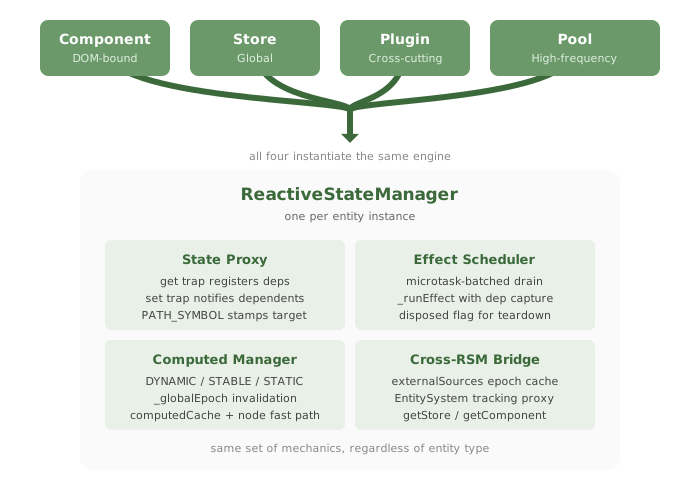
Components, stores, plugins, and pools all share the same reactive engine. There is one ReactiveStateManager implementation, and each component, store, plugin, or pool gets one instance of it. The engine's behavior is identical across the four kinds.

The four entity types (component, store, plugin, pool) all instantiate the same ReactiveStateManager

One terminology note about pools, because the framework overloads the word "entity": a pool is one of the four entity-types and gets one RSM. The items inside a pool are also called entities (per the per-entity declaration shape: entity: { state, computed, methods }) but those items share the pool's single RSM rather than each having their own. A pool with 2600 boids is one RSM, not 2600. That is the whole point of pools: high-frequency rendering at scale, without paying for thousands of independent reactive contexts.

This architectural decision is one of the framework's structural strengths. Each kind wraps the same engine in slightly different lifecycle hooks: a component has DOM, a store does not, a pool has many items sharing one renderer and one RSM. But the proxy traps, the effect scheduler, the computed evaluator, and the cross-RSM bridge are the same code for all four.

Practical consequence: anything you learn about how a component reacts applies unchanged to a store, a plugin, or a pool. Computed properties promote the same way. Effects schedule the same way. Cross-entity reads work the same way.

Why it matters: when you read ReactiveStateManager.js or ProxyHandlers.js, you are reading the entire reactive system. There is no separate code path for stores, no different proxy for plugins. The single-implementation property is what makes the framework possible to learn end-to-end.

2. The proxy in the middle

Your state object is a JavaScript Proxy. Every read passes through the get trap; every write passes through the set trap. Those two traps are where reactivity is implemented.
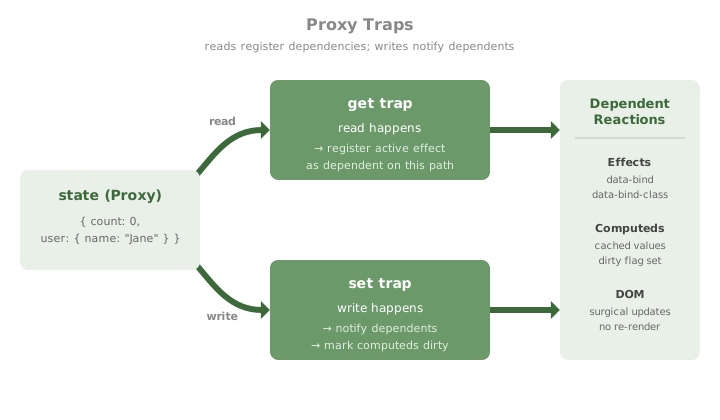
Get trap registers dependencies; set trap notifies dependents

The get trap does dependency tracking. When code inside an effect or a computed property reads this.state.user.name, the get trap notes that the currently-executing reactive function depends on the path user.name. That dependency is recorded so the function can be re-run later if the path changes.

The set trap does notification. When code writes this.state.user.name = "Bob", the set trap walks the list of dependents registered for user.name (and the parent paths) and queues each for re-evaluation. It also marks any computed property that depends on user.name as dirty, so the next read of that computed will re-evaluate.

The two traps together form a complete dependency graph that is built dynamically by code execution. There is no static analysis step, no compiler, and no manual useState-style declaration of what depends on what. The graph is implicit in the reads and writes your code performs.

Subtle point: the get trap only registers a dependency when an effect or computed is currently executing. Reads outside any reactive context (for example, in a console log or a regular method called manually) pass through cleanly without registering anything. This is what makes the framework work without explicit subscribe/unsubscribe ceremony.

3. Three update paths

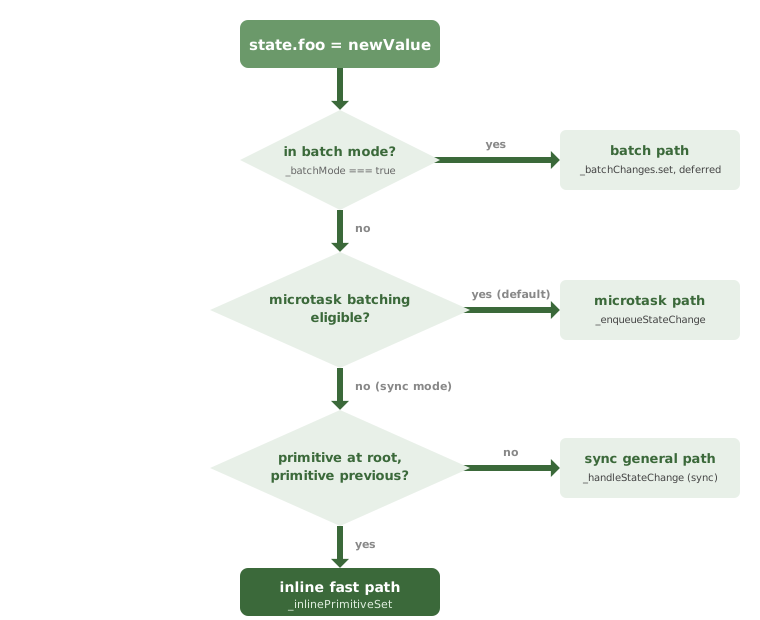
A single line of user code can take one of four paths through the set trap. The framework picks at runtime, by checking three conditions in order.

Decision tree showing four update paths: batch mode, microtask, sync general, and inline fast path

How the path is chosen

Every write to this.state.X enters the proxy set trap. The trap walks three checks in order, and the first one that resolves picks the path:

  1. Is the entity currently in batch mode? Concretely, is wildflower._batchMode set to true? Batch mode can be entered two ways. The user can enter it explicitly via wildflower.batch(fn) or startBatch(). The framework also enters it automatically around certain compound operations where atomicity matters: form submission, props propagation through a component hierarchy, and batched list updates. In both cases the flag is cleared by the matching applyBatch() or cancelBatch(). While true, every write is recorded into the entity's _batchChanges Map and deferred. No notifications fire until the batch closes.
    This path can be opted into per-call, and is also entered automatically by the framework when several internal operations need atomicity.
  2. Is microtask batching eligible for this entity? Each ReactiveStateManager caches an _microtaskBatchingEligible flag at construction time, computed once from three sources: the framework-level { syncMode: true } option passed to new WildflowerJS(), a per-component disableMicrotaskBatching opt-out, and a global override. None of these change at runtime. If eligible (the default for almost every component), notifications go on the microtask queue and coalesce naturally with other writes in the same synchronous block.
    This is a framework-level configuration choice, baked in at instantiation. You don't control it per-write.
  3. Is this an inline-fast-path-eligible write? Only checked when batch mode is off and microtask batching is also off. The write must be a primitive (number, string, boolean, or null) assigned to a top-level property of state (not nested), with the previous value also a primitive. If all three are true, the framework runs _inlinePrimitiveSet, which fuses several steps into one tight function call. Otherwise the write goes through the synchronous general path.
    You don't control this at all. It's an internal optimization that fires when the write happens to be simple enough.

From the user's side, the path you choose explicitly is batch mode, once per batch() call. The framework can also enter batch mode on its own around compound operations like form submission and props propagation; you do not control those entries, but the underlying mechanism is the same. Microtask vs sync is decided once when you instantiate the framework. The inline fast path is invisible to user code; it is a sync-mode optimization the framework picks up on its own.

Batch mode

If the entity is currently inside wildflower.batch(fn) (or between startBatch() and applyBatch()), every write is recorded into a per-entity _batchChanges Map and deferred. No effects fire, no DOM updates, no computeds re-evaluate. When the batch applies, all recorded changes are flushed at once into a single render.

// Three writes, one render.
wildflower.batch(() => {
    this.state.count = 1
    this.state.name = "x"
    this.state.items.push(newItem)
})
// effects fire here, after the batch closes

Microtask path (the default)

Outside batch mode, the default is microtask-batched. Writes happen synchronously into the underlying state object, but the notifications (effect re-runs, DOM updates, computed re-evaluations) are deferred to a microtask. Multiple writes in the same synchronous block coalesce naturally: by the time the microtask drains, only the final value of each path is visible.

// Same effect: three writes coalesce into one DOM update.
this.state.count = 1
this.state.name = "x"
this.state.items.push(newItem)
// no batch() call needed; the microtask handles it

Synchronous path

If the framework was constructed with { syncMode: true }, or the component opts out of microtask batching, writes notify dependents immediately and synchronously. Effects fire before the next line of user code runs.

Sync mode is for interop with non-reactive code that needs to observe state changes during the same call (testing harnesses, certain animation libraries, headless rendering pipelines). It costs more per write because it can't coalesce, and it changes the timing assumptions effects can make about each other.

Inline fast path (an internal optimization)

When all of these are true at once: not in batch mode, microtask batching is off, the property is a primitive (number, string, boolean), and the write is at the root of the state object (not nested), the framework takes a tighter inline path that fuses the set trap, version bump, dependent notification, and onStateChange dispatch into a single function (_inlinePrimitiveSet). This path is performance-only; the observable behavior is identical to the synchronous path. Most users never trigger it because microtask batching is the default.

Why these paths exist: the microtask path is the right default because it coalesces naturally and matches what users intuitively expect (set three things, render once). The synchronous path exists for interop. The inline fast path exists because the framework should not impose unbounded overhead when the user explicitly opted out of batching. Batch mode exists because some compound operations should be atomic from the rendering system's perspective.

4. The computed promotion ladder

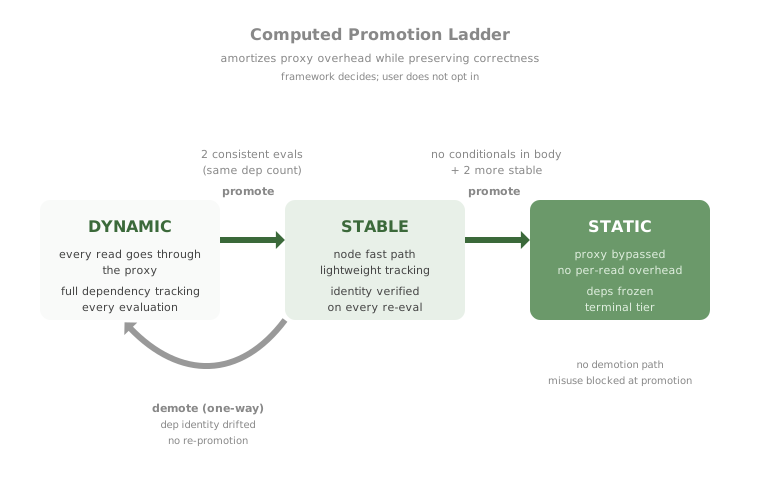
Computed properties have three internal evaluation tiers. The framework decides which tier a computed belongs to by observing how it actually behaves; the user does not opt in.

Computed promotion ladder showing DYNAMIC, STABLE, and STATIC tiers

DYNAMIC: every evaluation does full work

A new computed starts as DYNAMIC. Every read goes through the proxy, every dependency is re-tracked from scratch, and the computed is fully re-evaluated whenever any current dependency changes. This is the safe baseline; it always produces correct values, just at the highest per-read cost.

STABLE: lightweight tracking, identity verified

After two consecutive evaluations produce the same set of dependencies (same number of distinct state paths read), the framework promotes to STABLE. STABLE uses the node fast path: a cheaper code path that still tracks dependencies but skips most of the proxy machinery. On every re-evaluation, STABLE verifies that the current dependency set matches the one captured at promotion. If identity drifts (the computed reads a different set of paths than before), STABLE demotes one-way back to DYNAMIC and never re-promotes.

STATIC: proxy bypassed entirely

If a STABLE computed has no conditional syntax in its body (no if, else, ?, &&, ||, ??, no function calls), and produces consistent dependency identity for two more evaluations, it promotes again to STATIC. STATIC bypasses the proxy on reads entirely. Dependencies are baked in at promotion time and never re-tracked. This is the fastest tier.

STATIC has no demotion path. The framework only promotes a computed to STATIC if it can prove (by static inspection of the function body) that the dependency set cannot vary across evaluations. If your computed body has any conditional construct, STATIC is unreachable for it; it stays on STABLE forever.

What this means in practice: the more deterministic your computed (no branching, simple expression), the cheaper it gets to read. The framework rewards code that the optimizer can reason about. A computed like fullName() { return this.state.firstName + ' ' + this.state.lastName } reaches STATIC. A computed like display() { return this.showFull ? this.fullName : this.firstName } stays on STABLE because of the ternary.
One sharp edge: if your computed delegates to a helper function whose body contains conditionals, the framework cannot see inside the helper. The outer body looks branch-free, so STATIC promotion is allowed, but the helper's actual behavior may vary across evaluations. The framework guards against this by treating any function call (anything matching \w() as a conditional, blocking STATIC promotion. The result is that pure helpers (Math.max, formatDate) stay on STABLE rather than promoting to STATIC. STABLE is still fast; STATIC is just faster.

5. Effects vs render: the timer story

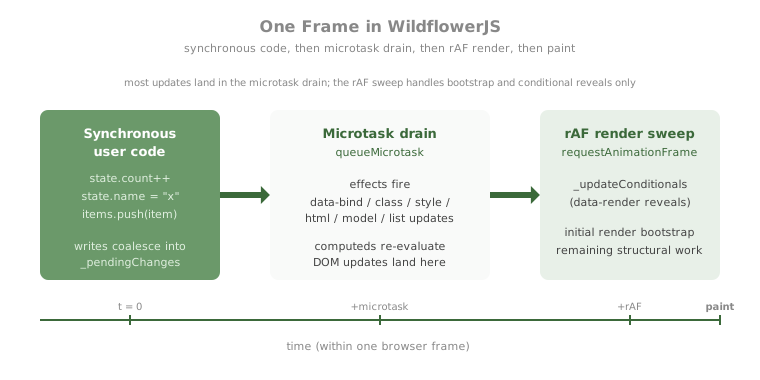
Two timing primitives are in play: the microtask queue and requestAnimationFrame. Different update categories run on different timers.

Timeline showing synchronous code, microtask drain, rAF render, and browser paint

The framework's working assumption is: do as much work as possible in the microtask drain, because microtasks run before the browser paints and have no animation-frame jitter. Use the rAF only for work that genuinely needs to align with paint timing or that has bootstrap dependencies that the microtask cannot satisfy.

After the v1.1 unification, almost every kind of update flows through effects on the microtask: data-bind, data-bind-class, data-bind-style, data-bind-attr, data-bind-html, data-model, and the entire data-list pipeline (lists are now built on mapArray, which is effect-driven). The rAF render sweep handles only two things: data-render conditional reveals and the initial-render bootstrap when a component first mounts.

Tearing window: there is a small window between the microtask drain and the rAF where effect-driven bindings have already updated the DOM but conditional reveals (data-render) have not yet run. Both happen before the next browser paint, so a user never sees an inconsistent state. But if your code reads the DOM directly between those two timers (uncommon outside test harnesses), it will observe the effect-driven changes but not the conditional reveals.

Why most things are effects now, not render-driven

Earlier versions of the framework used the rAF render sweep for nearly everything. The unification to effect-driven updates was driven by two observations: effects are inherently fine-grained (one effect per binding context, so an update cost only what needed updating), and microtask timing avoids the 16ms quantization of rAF.

The rAF render still exists because some operations are most naturally expressed as a sweep over the DOM tree (revealing conditionals, reconciling structural changes during initial mount). For those, effects would fragment the work into too many independent runs.

6. Cross-store reactivity

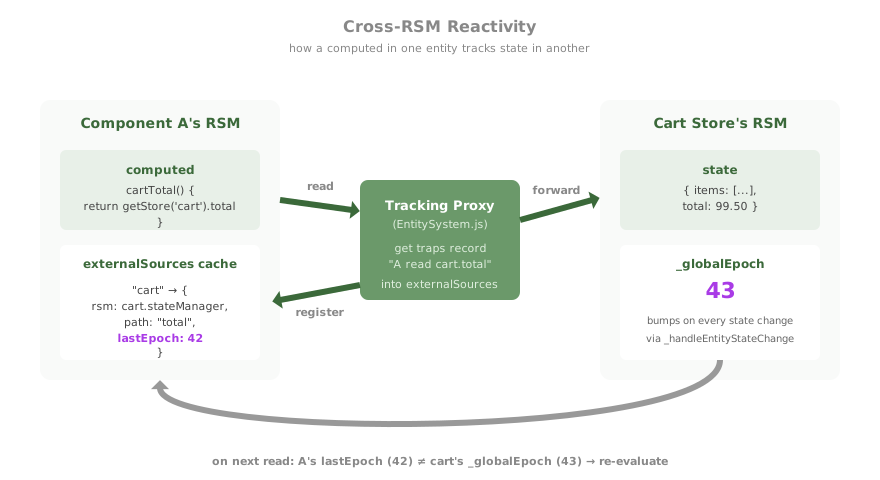
Every component, store, plugin, and pool has its own RSM. (As noted in section 1, items inside a pool share the pool's RSM rather than each getting their own; a pool with 2600 items is still one RSM.) Within an RSM, dependency tracking is direct: the proxy get trap registers the active effect into a per-path Map, and the set trap walks that Map. Across RSMs, dependency tracking has to bridge two separate dependency graphs.

Cross-RSM bridge showing tracking proxy and externalSources epoch cache

The bridge is a tracking proxy returned by wildflower.getStore(), wildflower.getComponent(), and the $entity-name accessor. When you read wildflower.getStore('cart').total from inside a component A's computed, you are not reading the cart's raw state; you are reading through a tracking proxy whose get trap records on A's RSM that "this computed depends on the cart's total path."

The recorded dependency is stored in A's externalSources map, keyed by the source RSM's identity, with the source RSM's _globalEpoch stamped as lastEpoch. Whenever the cart's RSM mutates state, its _globalEpoch bumps. The next time component A re-evaluates the computed, it compares its cached lastEpoch to the cart's current epoch; if they differ, the computed re-evaluates fully.

Why epoch tracking, not direct subscription

Direct subscription (every cross-store dependency wires up a callback on the source) would require explicit unsubscribe on teardown, would scale poorly with many small dependents, and would create cycles when stores depend on each other. Epoch tracking is pull-based: the dependent checks on its own re-evaluation rather than being pushed into. This is cheap (one integer compare per cached source), composable (epochs propagate transitively through entity tracking proxies), and self-cleaning (when the dependent component is destroyed, its externalSources goes with it).

// In component A
computed: {
    cartTotal() {
        // returns the cart's total, reactively
        return wildflower.getStore('cart').total
    }
}

// In the cart store, somewhere
this.state.items.push(item)  // bumps cart's _globalEpoch
// next time A reads cartTotal, the epoch mismatch triggers re-eval
The supported pattern: always reach across stores via getStore(), getComponent(), or $entity-name. If you grab a raw reference to another store's state object directly (for example by capturing it in a closure), the tracking proxy is bypassed and dependency tracking is silently lost. The reactive update will not fire. The framework has no way to detect this; it relies on the convention that cross-entity reads always go through the tracking surface.

7. Lifecycle phases that change the rules

The reactive engine behaves slightly differently depending on where in a component's life the operation happens. Three windows are worth knowing.

Pre-init action queueing

If a DOM event (a click, an input event, a keydown) fires after a component's element exists but before its init() hook has finished, the action handler does not run immediately. It is queued. When init() returns, queued handlers replay in their original order. This matters most for components that subscribe to slow-loading stores: init may await a Promise.all of subscriptions for several macrotasks, and any user interaction during that window would otherwise hit a partially-initialized component.

Replayed handlers see the original DOM event, but with one limitation: event.preventDefault() is a no-op by replay time because the browser has already processed the default action. For forms that need to reliably block submission across the replay boundary, use data-event-prevent on the form element. The framework intercepts the event before user code runs.

One related constraint: a method named exactly init, beforeInit, destroy, beforeDestroy, onUpdate, beforeUpdate, onError, or tick is treated as a framework-driven lifecycle hook and is not queueable. Don't reuse those names for action handlers. The most common trap is tick: it gets called every animation frame for components in the pool loop, not on click.

HTML flash queue

data-bind-html writes that happen during component initial setup are queued into a per-RSM _htmlInitialQueue rather than applied immediately. The framework drains the queue when the binding context for the affected element registers, which typically happens later in the same initialization tick. The reason is to prevent a brief flash of unsanitized or incomplete HTML between the element being parsed and the binding context being ready to render it correctly.

The drain runs lazily and is bounded to the component's own RSM, so even pathological initialization paths cannot leak the queue into a different component's lifecycle.

Destroy-time effect sweep

When a component is destroyed, the framework walks both the component instance's _effects set and the context's _effects set, disposing each. This handles two scope cases: framework-internal code creates effects with scope: instance, while user code inside init() creates effects with scope: this (where this is the context proxy). Both Sets need a sweep on teardown, with snapshots so effects that self-remove during disposal don't break iteration.

The user's destroy() hook fires before the sweep, but binding effects scheduled by state mutations inside destroy() are protected: the component's context is removed from the registry before the destroy hook runs, so binding effects that try to look up their target context find nothing and silently no-op. The combined effect is that destroy() can safely mutate state without leaking effects past teardown.

8. Conditional reads and dep tracking

The framework tracks dependencies by intercepting reads through the state proxy. When you write this.state.foo inside a computed or effect, the proxy's GET trap records "this binding depends on state.foo." When that field later changes, every binding that read it gets queued for re-evaluation.

The constraint: only reads that actually execute get tracked. JavaScript's short-circuit semantics for &&, ||, and ternary ?: mean that some reads in the source code don't always happen at runtime. Consider:

computed: {
    isOpen(item) {
        const s = this.state;
        return s.openField === 'status' && s.openId === item.id;
    }
}

When isOpen first evaluates with openField equal to null, the && short-circuits and s.openId is never read. The binding's tracked dependencies are { openField } only. Now imagine the user flow that opens a popover and then switches to a different row:

  1. Click row A. openField changes from null to 'status', openId changes from null to 'a'. Every binding that tracked openField wakes up. They all re-evaluate. This time the && doesn't short-circuit (left side is truthy), so openId gets read and tracked. Every binding now has both fields as dependencies. UI updates correctly.
  2. Click row B. openField stays 'status'. Only openId changes (from 'a' to 'b'). Bindings that tracked both fields wake. But bindings whose initial evaluation had short-circuited at openField may have tracked only that one field, depending on render order. Those bindings don't wake. Their rows' DOM never updates. UI is wrong.

The symptom is non-deterministic across reloads: sometimes the framework happens to evaluate every row's binding under a state shape that reads both fields, sometimes it doesn't. Initial render order, click order, and which row was first to evaluate truthy all influence which bindings have complete dependency sets.

This is a property of all runtime-proxy reactive systems (Vue, Solid, MobX, Preact Signals). It is not a WildflowerJS bug; it is the price of "no compiler." The compiler-based alternative (Svelte, Vue's <script setup> with reactive transforms) extracts dependencies via AST analysis at build time and records them regardless of control flow. WildflowerJS's positioning explicitly trades compile-time analysis for the no-build-step authoring story, so this characteristic is inherited from the runtime-proxy family.

The fix is to read all potentially-relevant fields eagerly at the top of the computed, before any branching:

computed: {
    isOpen(item) {
        const s = this.state;
        const f = s.openField;   // always read; always tracked
        const id = s.openId;     // always read; always tracked
        return f === 'status' && id === item.id;
    }
}

The eager destructuring forces both proxy reads on every invocation, so both fields end up in the binding's dependency set from the first evaluation onward. Subsequent state changes to either field correctly wake the binding.

This pattern applies anywhere a computed or effect conditionally reads state: &&, ||, ternary, if/else, early return. The rule is mechanical: every field the computed could read on any branch should be read once before the branching begins.

9. When to think about any of this

The defaults (microtask batching, automatic computed promotion, no batch mode, post-init action dispatch) are correct on their own. You don't need to know any of this to write code that works. The page exists for the cases where you want to intentionally step outside the defaults, and you need to understand the machinery in order to do that confidently.

Those cases are:

  • You are debugging a "why didn't this update?" symptom. The most common cause is a closure-captured reference to another entity's state, bypassing the tracking proxy that getStore(), getComponent(), and the $entity-name accessor would have provided. See Communication for the supported cross-entity patterns and Common Mistakes for the specific anti-patterns to recognize.
  • You are debugging a "why did this fire twice?" symptom. Look at whether the same logical operation is being seen by both an effect and the rAF render sweep, or whether a component is being re-initialized. Section 5 above describes which categories of update flow through which timer.
  • You are writing a plugin or a custom directive. Plugins use the same RSM as components, but your plugin's effects need to register with the right scope or they will not be cleaned up at destroy. See Basic Plugins for the registration shape and Advanced Plugins for the lifecycle and effect-cleanup details.
  • You are doing animation-heavy or high-frequency work. Pools exist precisely because the per-component RSM overhead would be prohibitive at hundreds or thousands of items updating per frame. A pool sets up one RSM and one renderer regardless of how many items it holds, and bypasses several layers of the standard reactive pipeline. See Why Pools? for the motivating use cases, Pools for the API, and Entity Model for the per-entity declaration shape.
  • You are interoperating with non-reactive code. Sync mode ({ syncMode: true } at framework instantiation), the batch API (wildflower.batch(fn) or startBatch()/applyBatch()), and wildflower.whenSettled() are the bridges into systems that cannot be retrofit to the microtask drain. The batch path is described in section 3 above; the timing model in section 5 above.

Outside those cases, the engine fades into the background. That is the design goal.

The single most important thing to remember: reads through the framework's tracking surfaces (this.state, getStore(), getComponent(), $entity-name) participate in reactivity. Reads through anything else (closures over external references, manually captured objects) do not. When in doubt, route through the tracking surface.