



Lifecycle Hooks
Hook into component creation, updates, and destruction to run custom logic at the right time.
Component Lifecycle Overview
WildflowerJS components go through a predictable lifecycle with hooks at each phase:
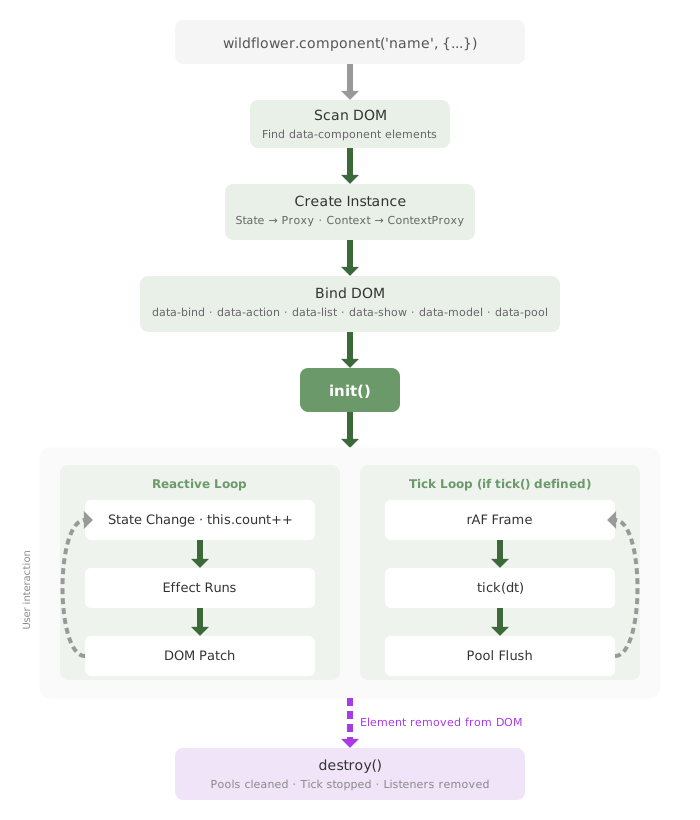
Creation
Component is instantiated and initialized
beforeInit()init()
Updates
State changes trigger reactive updates
beforeUpdate()onUpdate()
Errors
Catch and handle errors gracefully
onError()
Destruction
Component is removed and cleaned up
beforeDestroy()destroy()
Lifecycle Hook Summary
| Hook | When Called | Use Case |
|---|---|---|
beforeInit() |
After methods bound, before DOM bindings processed | Measure DOM, set up observers before reactive bindings |
init() |
After DOM bindings registered | API calls, start timers, focus management, initialize libraries |
beforeUpdate() |
Before state change applied to DOM | Capture scroll position, prepare animations |
onUpdate() |
After DOM updated | Restore scroll, trigger animations, sync external libraries |
tick(dt) |
Every animation frame | Per-frame animation, simulations, canvas drawing, real-time data feeds |
beforeDestroy() |
Before component cleanup starts | Save state, cleanup warnings, final data persistence |
destroy() |
After cleanup complete | Clear timers, remove global listeners, release resources |
onError() |
When an error occurs in the component | Error handling, show fallback UI, log errors |
onStoreUpdate() |
When a subscribed store path changes | React to store changes with centralized logic |
beforeUpdate and onUpdate) receive no parameters. Use watchers if you need to track specific property changes.
this.state inside beforeUpdate() or onUpdate() as this can trigger infinite update loops. Use non-reactive instance properties (like this._myValue) for temporary values needed between hooks.
init, beforeInit, destroy, beforeDestroy, onUpdate, beforeUpdate, onError, tick. Don't define a non-lifecycle method (action handler, helper) with one of these names. It will run on the framework's schedule, not yours. tick is the most common trap if used unintentionally: it's a real per-frame lifecycle hook (see the tick section below); name your method differently if you only want a regular handler.
beforeInit() - Pre-Initialization Hook
The beforeInit() hook runs after component methods are bound but before DOM bindings are processed. Use it for setup that needs to happen before reactive bindings take effect:
wildflower.component('measured-component', {
    state: {
        initialWidth: 0,
        initialHeight: 0
    },

    beforeInit() {
        // DOM exists but bindings haven't updated it yet
        // Good for measuring initial dimensions, setting up observers
        const rect = this.element.getBoundingClientRect()
        this.initialWidth = rect.width
        this.initialHeight = rect.height

        console.log('Before bindings:', this.element.querySelector('[data-bind]')?.textContent)
        // Will show empty or original content, not bound values
    },

    init() {
        // Bindings are now registered (though render may still be pending)
        console.log('Component ready, initial size:',
            this.initialWidth, 'x', this.initialHeight)
    }
})
beforeInit() with Components in Lists
When a component is rendered inside a data-list template, use beforeInit() to access the list item data before bindings are processed:
wildflower.component('list-item-component', {
    state: {
        itemId: null,
        itemName: ''
    },

    beforeInit() {
        // Access list item data stored on the element
        const itemData = this.element._itemData;
        if (itemData) {
            this.itemId = itemData.id;
            this.itemName = itemData.name;
        }
    },

    init() {
        // Set up store subscriptions to keep in sync
        const store = wildflower.getStore('myStore');
        store.subscribe('items', (newItems) => {
            const item = newItems.find(i => i.id === this.itemId);
            if (item) {
                this.itemName = item.name;
            }
        });
    }
})
<!-- Usage in template -->
<div data-list="$store.items">
<template>
<div data-component="list-item-component">
<h3 data-bind="itemName"></h3>
</div>
</template>
</div>element._itemData- The list item data objectelement._itemIndex- The index in the arrayelement._listContext- Reference to the parent list context
init() - Component Initialization
The init() method runs once after bindings are registered. This is the primary initialization hook for most use cases:
<div data-component="timer-lifecycle-demo">
    <div class="row">
        <div class="col-md-6">
            <h5>Timer Controls</h5>
            <div class="mb-3">
                <p><strong>Started at:</strong> <span data-bind="startTime"></span></p>
                <p><strong>Current time:</strong> <span data-bind="currentTime"></span></p>
                <p><strong>Elapsed:</strong> <span data-bind="elapsed" class="badge bg-primary"></span> seconds</p>
                <p><strong>Status:</strong> <span data-bind="statusText" class="badge"></span></p>
            </div>

            <div class="mb-3">
                <button data-action="toggleTimer"
                        class="btn btn-primary me-2"
                        data-bind-class="isRunning ? 'btn-danger' : 'btn-success'">
                    <span data-bind="toggleButtonText"></span>
                </button>
                <button data-action="resetTimer" class="btn btn-secondary me-2">
                    Reset
                </button>
                <button data-action="addLap" class="btn btn-info" data-show="isRunning">
                    Add Lap
                </button>
            </div>
        </div>

        <div class="col-md-6">
            <h5>Initialization Info</h5>
            <div class="p-3 border rounded bg-light">
                <p><strong>Component ID:</strong> <code data-bind="componentId"></code></p>
                <p><strong>Init Time:</strong> <span data-bind="initTime"></span></p>
                <p><strong>Updates Count:</strong> <span data-bind="updateCount"></span></p>
                <p><strong>Auto Started:</strong> <span data-bind="autoStarted"></span></p>
            </div>
        </div>
    </div>

    <div class="mt-3" data-show="hasLaps">
        <h5>Lap Times</h5>
        <div class="border rounded p-2" style="max-height: 150px; overflow-y: auto;">
            <div data-list="laps">
                <template>
                    <div class="d-flex justify-content-between small py-1">
                        <span>Lap <span data-bind="number"></span></span>
                        <span><span data-bind="time"></span>s at <span data-bind="timestamp"></span></span>
                    </div>
                </template>
            </div>
        </div>
    </div>
</div>
wildflower.component('timer-lifecycle-demo', {
state: {
startTime: '',
startTimestamp: 0, // Store actual timestamp for calculations
currentTime: '',
elapsed: 0,
lastLapTime: 0, // Track last lap time for split calculation
isRunning: false,
intervalId: null,
componentId: '',
initTime: '',
updateCount: 0,
autoStarted: false,
laps: []
},
computed: {
statusText() {
return this.isRunning ? 'Running' : 'Stopped'
},
toggleButtonText() {
return this.isRunning ? 'Stop Timer' : 'Start Timer'
},
hasLaps() {
return this.laps.length > 0
}
},
// Lifecycle: Component initialization
init() {
console.log('Timer component initialized with ID:', this.id)
// Store component information
this.componentId = this.id
this.initTime = new Date().toLocaleTimeString()
// Set initial time display (timer not started yet)
this.currentTime = new Date().toLocaleTimeString()
this.startTime = '(not started)'
this.elapsed = 0
// Auto-start flag shows init ran
this.autoStarted = true
// Log initialization completion
console.log('Timer component fully initialized at:', this.initTime)
// Example of setting up initial data or external connections in init()
this.loadInitialData()
},
// Example of data loading in init()
loadInitialData() {
// Simulate loading some initial configuration
setTimeout(() => {
console.log('Initial data loaded in init()')
}, 100)
},
startTimer() {
if (!this.isRunning) {
// Set start time when timer actually starts
const now = Date.now()
this.startTime = new Date(now).toLocaleTimeString()
this.startTimestamp = now
this.elapsed = 0
this.isRunning = true
this.intervalId = setInterval(() => {
this.currentTime = new Date().toLocaleTimeString()
this.updateCount++
// Calculate elapsed time using stored timestamp
const newElapsed = Math.floor((Date.now() - this.startTimestamp) / 1000)
// Only update if changed to prevent unnecessary updates
if (this.elapsed !== newElapsed) {
this.elapsed = newElapsed
}
}, 1000)
}
},
stopTimer() {
if (this.isRunning) {
this.isRunning = false
if (this.intervalId) {
clearInterval(this.intervalId)
this.intervalId = null
}
}
},
toggleTimer() {
if (this.isRunning) {
this.stopTimer()
} else {
this.startTimer()
}
},
resetTimer() {
this.stopTimer()
this.startTime = '(not started)'
this.startTimestamp = 0
this.currentTime = new Date().toLocaleTimeString()
this.elapsed = 0
this.lastLapTime = 0
this.laps = []
this.updateCount = 0
},
addLap() {
if (this.isRunning) {
const splitTime = this.elapsed - this.lastLapTime
this.laps.push({
time: splitTime,
timestamp: new Date().toLocaleTimeString(),
number: this.laps.length + 1
})
this.lastLapTime = this.elapsed
}
},
// Lifecycle: Cleanup (called when component is destroyed)
destroy() {
console.log('Timer component destroyed:', this.componentId)
this.stopTimer()
// Clear any other resources that were set up in init()
console.log('All timer resources cleaned up')
}
})Actions Before init() Completes
What happens if a user clicks a button before init() has finished running? Nothing is lost. Action handlers fired before init() completes are deferred and replayed in order after init returns.
This matters because init() runs on a separate macrotask from when the component mounts (the framework defers it so the browser can paint), and may further defer waiting for subscribed stores to become ready. Without this guard, an early click would fire against pre-init state and silently see the wrong values.
wildflower.component('quick-clicker', {
    state: { ready: false, count: 0 },

    init() {
        // Heavy setup, store subscriptions, etc.
        this.ready = true
    },

    increment() {
        // Whether called by an immediate click or a click that fired
        // before init() completed and got replayed afterwards, the
        // post-init state is what this method observes.
        this.count++
    }
})event.preventDefault() from a queued click: the prevent has no effect because the browser already fired its default action. See Advanced Forms for the narrow workaround. Errors thrown during replay route through the component's onError hook, the same as any other method invocation.
beforeUpdate() - Pre-Update Hook
The beforeUpdate() hook runs before state changes are applied to the DOM. Use it to capture state before the DOM updates:
wildflower.component('scroll-preserver', {
    state: {
        items: []
    },

    init() {
        // Use non-reactive property to avoid triggering updates
        this._savedScrollTop = 0
    },

    beforeUpdate() {
        // Capture scroll position before DOM changes
        const container = this.element.querySelector('.scroll-container')
        if (container) {
            this._savedScrollTop = container.scrollTop
        }
    },

    onUpdate() {
        // Restore scroll position after DOM updates
        const container = this.element.querySelector('.scroll-container')
        if (container) {
            container.scrollTop = this._savedScrollTop
        }
    }
})
onUpdate() - Post-Update Hook
The onUpdate() method runs after state changes and DOM updates:
<div data-component="analytics-tracker-demo">
    <div class="row">
        <div class="col-md-4">
            <h5>Click Tracking</h5>
            <button data-action="incrementClicks" class="btn btn-primary mb-2">
                Click Me!
            </button>
            <p><strong>Button clicks:</strong> <span data-bind="clickCount" class="badge bg-primary"></span></p>
            <button data-action="simulateClicks" class="btn btn-sm btn-primary">
                Simulate 5 Clicks
            </button>
        </div>

        <div class="col-md-4">
            <h5>Search Tracking</h5>
            <input type="text"
                   data-model="searchQuery"
                   placeholder="Type to search..."
                   class="form-control mb-2">
            <p><strong>Search queries:</strong> <span data-bind="searchCount" class="badge bg-success"></span></p>
            <button data-action="clearSearch" class="btn btn-sm btn-secondary">
                Clear Search
            </button>
        </div>

        <div class="col-md-4">
            <h5>Update Metrics</h5>
            <p><strong>Total Updates:</strong> <span data-bind="totalUpdates" class="badge bg-info"></span></p>
            <p><strong>Last Update:</strong> <br><small data-bind="lastUpdatePaths"></small></p>
            <p><strong>Update Rate:</strong> <span data-bind="updateRate"></span>/min</p>
        </div>
    </div>

    <div class="mt-4">
        <div class="d-flex justify-content-between align-items-center mb-2">
            <h5>Activity Log (<span data-bind="logCount"></span> entries):</h5>
            <div>
                <button data-action="toggleAutoScroll"
                        class="btn btn-sm btn-info me-2"
                        data-bind-class="autoScroll ? 'active' : ''">
                    Auto-scroll: <span data-bind="autoScroll"></span>
                </button>
                <button data-action="clearLog" class="btn btn-sm btn-danger">
                    Clear Log
                </button>
            </div>
        </div>
        <div class="border rounded p-2" style="height: 200px; overflow-y: auto;" id="activity-log">
            <div data-list="activityLog">
                <template>
                    <div class="small d-flex justify-content-between py-1"
                         data-bind-class="type === 'update' ? 'text-primary' : type === 'click' ? 'text-success' : 'text-info'">
                        <span><span data-bind="timestamp"></span> - <span data-bind="action"></span></span>
                        <span class="badge badge-sm" data-bind-class="badgeClass">
                            <span data-bind="type"></span>
                        </span>
                    </div>
                </template>
            </div>
        </div>
    </div>
</div>
wildflower.component('analytics-tracker-demo', {
state: {
clickCount: 0,
searchCount: 0,
searchQuery: '',
activityLog: [],
totalUpdates: 0,
lastUpdatePaths: 'None yet',
lastUpdateTime: null,
firstUpdateTime: null,
autoScroll: true
},
computed: {
logCount() {
return this.activityLog.length
},
updateRate() {
if (!this.firstUpdateTime || this.totalUpdates < 2) return '0'
const minutes = (Date.now() - this.firstUpdateTime) / (1000 * 60)
return minutes > 0 ? Math.round(this.totalUpdates / minutes) : '0'
},
// Item-level computed for activity log badges: receives the row's item
badgeClass(entry) {
const classes = {
'update': 'bg-primary',
'click': 'bg-success',
'search': 'bg-info',
'init': 'bg-warning'
}
return classes[entry.type] || 'bg-secondary'
}
},
// Use watchers to track specific property changes
watch: {
clickCount(newVal, oldVal) {
this.logActivity(`Button clicked (total: ${newVal})`, 'click')
this.trackUpdate('clickCount')
},
searchQuery(newVal, oldVal) {
if (newVal.trim()) {
this.searchCount++
this.logActivity(`Searched for: "${newVal}"`, 'search')
} else if (oldVal.trim()) {
this.logActivity('Search cleared', 'search')
}
this.trackUpdate('searchQuery')
}
},
init() {
this.logActivity('Component initialized', 'init')
console.log('Analytics tracker initialized')
},
// Lifecycle: Runs after every state update (no parameters)
onUpdate() {
// Good for DOM operations after updates
// Auto-scroll activity log to bottom (if enabled)
if (this.autoScroll) {
this.scrollActivityLog()
}
},
trackUpdate(path) {
this.totalUpdates++
this.lastUpdatePaths = path
this.lastUpdateTime = Date.now()
if (!this.firstUpdateTime) this.firstUpdateTime = this.lastUpdateTime
},
incrementClicks() {
this.clickCount++
},
simulateClicks() {
// Simulate rapid clicking to show batched updates
for (let i = 0; i < 5; i++) {
setTimeout(() => {
this.clickCount++
}, i * 200)
}
},
clearSearch() {
this.searchQuery = ''
},
toggleAutoScroll() {
this.autoScroll = !this.autoScroll
},
clearLog() {
this.activityLog = []
this.logActivity('Activity log cleared', 'init')
},
logActivity(action, type = 'info') {
this.activityLog.push({
timestamp: new Date().toLocaleTimeString(),
action: action,
type: type
})
// Keep only last 50 activities
if (this.activityLog.length > 50) {
this.activityLog = this.activityLog.slice(-50)
}
},
scrollActivityLog() {
// Find the activity log container and scroll to bottom
setTimeout(() => {
const logContainer = this.element.querySelector('#activity-log')
if (logContainer) {
logContainer.scrollTop = logContainer.scrollHeight
}
}, 10)
}
})tick(dt) - Per-Frame Hook
The tick(dt) hook runs once per animation frame while the component is mounted. Define it when you need per-frame work: simulations, canvas drawing, smooth animations, real-time data feeds, anything that should advance with the screen refresh.
The framework manages one shared requestAnimationFrame loop. Adding a tick opts in; removing the component opts out. No manual requestAnimationFrame / cancelAnimationFrame bookkeeping is needed.
dt: milliseconds since the previous frame. Clamped to 250ms to prevent spiral-of-death after a long tab-switch or background pause.now(optional second argument): theperformance.now()timestamp for this frame. Useful when you need an absolute time reference.- Runs before any pool flush on the same frame, so entity mutations made in
tickreach the DOM on the same frame. - Works on components, stores, and plugins. Stores are the right home for simulations that should outlive any single component (see Stores).
- Works with or without pools. Useful for canvas drawing, WebGL/Three.js, headless data integration, or any per-frame logic.
- Stops automatically when the component is destroyed, along with the rAF loop if nothing else needs it.
wildflower.component('stopwatch', {
    state: { elapsed: 0, running: false },

    toggle() { this.running = !this.running; },
    reset()  { this.elapsed = 0; },

    // Called once per animation frame while the component is mounted.
    // dt is milliseconds since the last frame.
    tick(dt) {
        if (this.running) this.elapsed += dt;
    }
});dt, not a fixed step. Multiplying motion by dt keeps speeds the same whether the browser renders at 60fps, 120fps, or drops to 30fps under load. this.x += this.vx * dt behaves consistently across machines; this.x += this.vx does not.
Where does tick belong vs. other tools?
- Per-frame work (animation, simulation, sample feeds): use
tick(dt). - React to a specific state change: use
watch. Fires on change, not every frame. - Run periodically at a fixed interval, not every frame: use
setIntervalinsideinit()and clear it indestroy(). Don't usetickjust to throttle to slower-than-rAF cadence.
For pool-specific tick patterns (mutating pool.items each frame, working with entity.computed derived values), see the Pool API.
beforeDestroy() - Pre-Destruction Hook
The beforeDestroy() hook runs before component cleanup starts. The component is still fully functional at this point:
wildflower.component('form-with-unsaved-changes', {
    state: {
        formData: {},
        hasUnsavedChanges: false
    },

    beforeDestroy() {
        // Component is still fully functional here
        // Good for saving state, cleanup warnings, final persistence

        if (this.hasUnsavedChanges) {
            // Save draft to localStorage before destruction
            localStorage.setItem('formDraft', JSON.stringify(this.formData))
            console.log('Draft saved before component removal')
        }

        // Can still access this.element, this.state, etc.
        console.log('Component about to be destroyed:', this.id)
    },

    destroy() {
        // Cleanup has started - clear timers, listeners, etc.
        console.log('Component destroyed')
    }
})
destroy() - Component Cleanup
The destroy() method runs when a component is removed from the DOM:
<div data-component="lifecycle-manager-demo">
    <div class="row">
        <div class="col-md-6">
            <h5>Component Management</h5>
            <div class="mb-3">
                <button data-action="createWorkerComponent" class="btn btn-success me-2">
                    Create Worker Component
                </button>
                <button data-action="createTimerComponent" class="btn btn-info me-2">
                    Create Timer Component
                </button>
                <button data-action="removeAllComponents" class="btn btn-danger">
                    Remove All Components
                </button>
            </div>

            <div class="mb-3">
                <p><strong>Active Components:</strong> <span data-bind="activeComponentCount" class="badge bg-primary"></span></p>
                <p><strong>Total Created:</strong> <span data-bind="componentCounter" class="badge bg-info"></span></p>
                <p><strong>Total Destroyed:</strong> <span data-bind="destroyedCount" class="badge bg-warning"></span></p>
            </div>
        </div>

        <div class="col-md-6">
            <h5>Cleanup Log</h5>
            <div class="border rounded p-2" style="height: 150px; overflow-y: auto;">
                <div data-list="cleanupLog">
                    <template>
                        <div class="small d-flex justify-content-between py-1"
                             data-bind-class="type === 'create' ? 'text-success' : 'text-danger'">
                            <span><span data-bind="timestamp"></span> - <span data-bind="message"></span></span>
                            <span class="badge badge-sm" data-bind-class="type === 'create' ? 'bg-success' : 'bg-danger'">
                                <span data-bind="type"></span>
                            </span>
                        </div>
                    </template>
                </div>
            </div>
            <button data-action="clearLog" class="btn btn-sm btn-secondary mt-2">
                Clear Log
            </button>
        </div>
    </div>

    <div class="mt-4">
        <h5>Dynamic Components</h5>
        <div id="dynamic-components-container" class="border rounded p-2 min-height-100">
            <div data-show="hasNoComponents" class="text-center text-muted py-3">
                No components active. Create some to see lifecycle in action!
            </div>
            <!-- Dynamic components will be inserted here -->
        </div>
    </div>
</div>

<style>
.min-height-100 {
    min-height: 100px;
}
</style>
wildflower.component('lifecycle-manager-demo', {
state: {
componentCounter: 0,
activeComponents: [],
destroyedCount: 0,
cleanupLog: []
},
computed: {
activeComponentCount() {
return this.activeComponents.length
},
hasNoComponents() {
return this.activeComponents.length === 0
}
},
init() {
this.logCleanup('Manager component initialized', 'create')
// Set up global cleanup tracking
window.lifecycleManagerDemo = this
},
createWorkerComponent() {
this.componentCounter++
const componentId = `worker-${this.componentCounter}`
const componentHtml = `
<div data-component="worker-component" class="card mb-2" data-id="${componentId}">
<div class="card-body">
<h6>Worker Component #${this.componentCounter}</h6>
<p><strong>Status:</strong> <span data-bind="status"></span></p>
<p><strong>Work Done:</strong> <span data-bind="workCount"></span> tasks</p>
<p><strong>Component ID:</strong> <code data-bind="componentId"></code></p>
<button data-action="selfDestruct" class="btn btn-sm btn-danger">
Self Destruct
</button>
</div>
</div>
`
this.insertComponent(componentHtml, componentId)
},
createTimerComponent() {
this.componentCounter++
const componentId = `timer-${this.componentCounter}`
const componentHtml = `
<div data-component="timer-component" class="card mb-2" data-id="${componentId}">
<div class="card-body">
<h6>Timer Component #${this.componentCounter}</h6>
<p><strong>Time:</strong> <span data-bind="currentTime"></span></p>
<p><strong>Ticks:</strong> <span data-bind="tickCount"></span></p>
<p><strong>Component ID:</strong> <code data-bind="componentId"></code></p>
<button data-action="selfDestruct" class="btn btn-sm btn-danger">
Remove Timer
</button>
</div>
</div>
`
this.insertComponent(componentHtml, componentId)
},
insertComponent(html, componentId) {
const container = this.element.querySelector('#dynamic-components-container')
container.insertAdjacentHTML('beforeend', html)
// Track the component
this.activeComponents.push(componentId)
this.logCleanup(`Created component: ${componentId}`, 'create')
// Scan for new components
wildflower.scan(container)
},
removeAllComponents() {
const container = this.element.querySelector('#dynamic-components-container')
const components = container.querySelectorAll('[data-component]')
components.forEach(comp => comp.remove())
this.activeComponents = []
this.logCleanup('Removed all components', 'destroy')
},
// Called by child components when they're destroyed
notifyComponentDestroyed(componentId) {
this.activeComponents = this.activeComponents.filter(id => id !== componentId)
this.destroyedCount++
this.logCleanup(`Component destroyed: ${componentId}`, 'destroy')
},
logCleanup(message, type) {
this.cleanupLog.push({
timestamp: new Date().toLocaleTimeString(),
message: message,
type: type
})
// Keep only last 20 log entries
if (this.cleanupLog.length > 20) {
this.cleanupLog = this.cleanupLog.slice(-20)
}
},
clearLog() {
this.cleanupLog = []
},
destroy() {
this.logCleanup('Manager component destroyed', 'destroy')
window.lifecycleManagerDemo = null
}
})
// Worker component with cleanup
wildflower.component('worker-component', {
state: {
status: 'Starting...',
workCount: 0,
intervalId: null,
componentId: ''
},
init() {
this.componentId = this.element.dataset.id
this.status = 'Working'
// Simulate work being done
this.intervalId = setInterval(() => {
this.workCount++
this.status = `Completed ${this.workCount} tasks`
}, 1500)
console.log('Worker component initialized:', this.componentId)
},
selfDestruct() {
// Remove from DOM (triggers destroy)
this.element.remove()
},
destroy() {
console.log('Worker component destroyed:', this.componentId)
// Clear interval to prevent memory leak
if (this.intervalId) {
clearInterval(this.intervalId)
console.log('Work interval cleared for:', this.componentId)
}
// Notify parent manager
if (window.lifecycleManagerDemo) {
window.lifecycleManagerDemo.notifyComponentDestroyed(this.componentId)
}
this.status = 'Destroyed'
}
})
// Timer component with cleanup
wildflower.component('timer-component', {
state: {
currentTime: '',
tickCount: 0,
intervalId: null,
componentId: ''
},
init() {
this.componentId = this.element.dataset.id
this.currentTime = new Date().toLocaleTimeString()
// Update time every second
this.intervalId = setInterval(() => {
this.currentTime = new Date().toLocaleTimeString()
this.tickCount++
}, 1000)
console.log('Timer component initialized:', this.componentId)
},
selfDestruct() {
this.element.remove()
},
destroy() {
console.log('Timer component destroyed:', this.componentId)
// Clear timer interval
if (this.intervalId) {
clearInterval(this.intervalId)
console.log('Timer interval cleared for:', this.componentId)
}
// Notify parent manager
if (window.lifecycleManagerDemo) {
window.lifecycleManagerDemo.notifyComponentDestroyed(this.componentId)
}
}
})wildflower.destroyComponent(id) - Imperative Teardown
Most components are torn down implicitly: when their DOM element is removed (by a parent list re-render, a routed view change, an SPA navigation, or a manual element.remove()), the framework's mutation observer schedules cleanup automatically. The destroyComponent(id) API exists for the cases where you want to tear a component down without removing the element — for example, swapping out a component definition while keeping the host element in place.
// Look up the instance id, then destroy:
const id = element.dataset.componentId;
wildflower.destroyComponent(id);

// Or via the component instance:
wildflower.destroyComponent(this.id);
The call fires beforeDestroy and destroy hooks, disposes render effects and watchers, unsubscribes from stores, and removes the instance from wildflower.componentInstances. The DOM element is left untouched.
data-component-id (one whose instance is no longer in componentInstances) as a fresh component pending initialization. On the next scan — triggered by any DOM mutation, or an explicit wildflower.scan() — the stale id is stripped, a new instance is created, and its init() hook fires as if the component were mounting for the first time. This is intentional: it lets third-party HTML caches (DataTables, jQuery plugins) that serialize and replay DOM containing data-component-id attributes "just work" after replay. If you don't want re-initialization, remove the element from the DOM and destroy the instance.
Insufficient — auto-resurrect can re-init:
wildflower.destroyComponent(instance.id);
// Element still in DOM with stale data-component-id.
// Next scan → fresh instance → init() runs again.
Correct — element gone, no re-scan target:
instance.element.remove();
wildflower.destroyComponent(instance.id);
// Either order works; both must happen.
For the common case (removing UI), you usually don't need destroyComponent() at all — just remove the element and the framework cleans up. Reach for the explicit API only when you need to break the link between an instance and its DOM (rare).
onError() - Error Handling
The onError() lifecycle hook catches errors in component initialization, actions, computed properties, and destruction. This enables graceful error handling without crashing your application.
onError() handler catches them.
wildflower.component('data-loader', {
    state: {
        data: null,
        hasError: false,
        errorMessage: ''
    },

    init() {
        this.loadData()
    },

    loadData() {
        // This might throw an error
        const response = JSON.parse(invalidJson)
        this.data = response
    },

    // Catches errors from init, actions, computed, and destroy
    onError(error, context) {
        console.error('Error caught:', error.message)
        this.hasError = true
        this.errorMessage = error.message
        return true  // Error handled; return false to propagate to parent
    }
})
Full Error Boundaries Guide
For complete coverage of error propagation, fallback UI with data-error-fallback, reset/retry patterns, global error handlers, and best practices, see the dedicated guide:
onStoreUpdate() - Store Subscription Hook
The onStoreUpdate() hook is called when a subscribed store path changes. Use it with the declarative subscribe block for clean, centralized store change handling:
wildflower.component('lifecycle-widget', {
    state: {
        userName: '',
        cartCount: 0,
        theme: 'light'
    },

    // Declarative store subscriptions - enables this.stores
    subscribe: {
        'user': ['profile', 'preferences'],
        'cart': ['items']
    },

    // Called when ANY subscribed path changes
    onStoreUpdate(storeName, path, newValue, oldValue) {
        // storeName: which store changed ('user', 'cart', etc.)
        // path: which path changed ('profile', 'items', etc.)
        // newValue: the new value
        // oldValue: the previous value

        if (storeName === 'user') {
            if (path === 'profile') {
                this.userName = newValue?.name || 'Guest';
            } else if (path === 'preferences') {
                this.theme = newValue?.theme || 'light';
            }
        } else if (storeName === 'cart' && path === 'items') {
            this.cartCount = newValue?.length || 0;
        }
    },

    init() {
        // this.stores is available - auto-injected from subscribe block
        this.userName = this.stores.user.profile?.name || 'Guest';
        this.cartCount = this.stores.cart.items?.length || 0;
    }
});subscribeblock declares which stores and paths to watchthis.storesis auto-injected based on the subscribe blockonStoreUpdate()receives full context: store name, path, old and new values- Subscriptions are automatically cleaned up when the component is destroyed
- For more details, see Store Subscriptions